About Lock For Toddlers
Do you have toddlers? Do they beg to play with your phone? Are you afraid they will open or delete your apps or data? Well, now you can safely allow your toddler to play on your phone because Lock For Toddlers protects...
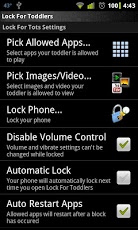
Do you have toddlers? Do they beg to play with your phone? Are you afraid they will open or delete your apps or data? Well, now you can safely allow your toddler to play on your phone because Lock For Toddlers protects your phone. Its easy. Select which apps to allow, then lock the phone and let your toddler have fun. The best child lock app.Features:- Blocks Ads and Market Downloads- Select allowed apps and block all others- Select allowed Image/Video/YouTube content that can be viewed by toddler- Toddler friendly viewers for allowed content- Enable/Disable require unlock to answer calls- Enable/Disable airplane mode when locked- Enable/Disable automatic restart of apps after block- Enable/Disable re-locking after answering a phone call- Enable/Disable volume and vibration control- Multiple unlock methodsPlease contact me with any questions, comments, gripes, or suggestions. NOTE: Currently I add features and settings based on my own use of the app. If you have suggestions I would love to make the app fit you needs.Coming soon:- More unlock types like password and number code.- Better media gallery and media playback options- Drawing game activity- Lock modes -> I plan on implementing some really cool modes that will help customize the app towards different child personalities- Other activities to appeal to wider age range. Specifically as my daughter is growing so are her expectations as I'm sure your children are.
Previous Versions
Here you can find the changelog of Lock For Toddlers since it was posted on our website on 2014-06-13 07:44:36.
The latest version is and it was updated on 2024-04-19 23:40:31. See below the changes in each version.
Lock For Toddlers version Pro
Updated At: 2012-12-11
Changes: Several fixes and updates
Lock For Toddlers version Pro
Updated At: 2012-12-11
Disclaimer
Official Google Play Link
We do not host Lock For Toddlers on our servers. We did not scan it for viruses, adware, spyware or other type of malware. This app is hosted by Google and passed their terms and conditions to be listed there. We recommend caution when installing it.
The Google Play link for Lock For Toddlers is provided to you by apps112.com without any warranties, representations or guarantees of any kind, so access it at your own risk.
If you have questions regarding this particular app contact the publisher directly. For questions about the functionalities of apps112.com contact us.